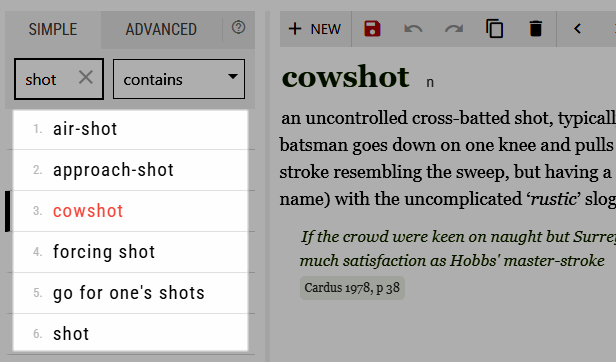
This is the headword list that appears to the left of the entry content, both when editing and viewing the entries. These items can be customised:
- the displayed elements in the list
- their styling (colour, size, font…)
- the element that should be used for sorting
- the language of the alphabetical order
By default, the list displays the element which contains the headword. The same element is used for sorting, no styling is applied, the alphabetical order is English.
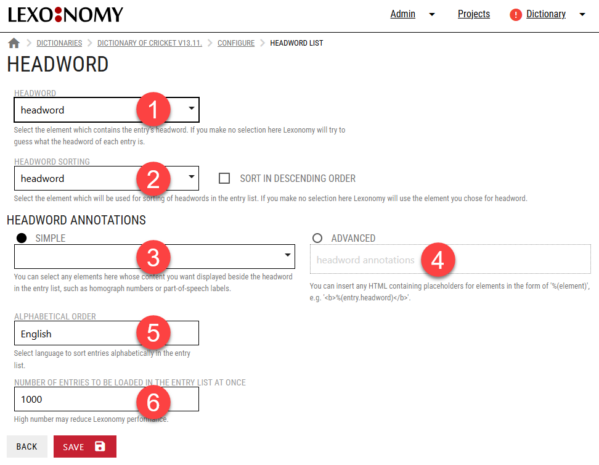
To customise these settings, go to CONFIGURE > HEADWORD LIST.
1 – This sets the element which contains the headword. Usually, the element is called headword but different dictionaries may use different names.
2 – This sets the element which should be used for sorting. Normally, it is the same element as headword but there are cases when the dictionary is sorted in a specific order specified by a specific element. Set the element here.
3 – Select one or more elements which should appear in the headword list.
4 – Set a custom style for the headword element including colours and sizes. More information below.
5 – Select the language whose alphabet should be used for sorting the entries. This ensures that regional specifics and special characters are taken into account.
6 – This setting ensures the web browser is not overloaded and the response is fast. Reduce the number for better performance on slow or outdated hardware.
Styling
Use (4) to apply styling to the headword list (colours, fonts, sizes…). The styling should be set in HTML and CSS. Any element can be included. The full path to the element must be used. (A path refers to the complete list of parent and child elements separated by a full stop.)
Examples
The paths to elements in your dictionary may differ from the examples. This depends on your entry structure.
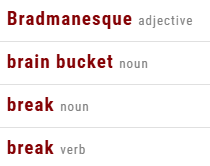
This HTML/CSS will make headword bold and pos small and grey.
<b style="color:darkred">%(headword)</b> <span style="font-size:small; color:grey">%(headword.pos)</span>
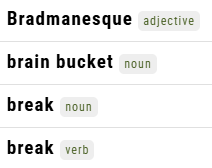
This HTML/CSS makes headword bold and puts pos on a silver background with rounded corners (5px), dark green font and space around of 3px horizontally and 5px vertically. Font size is 12px.
<b>%(headword)</b> <span style="font-size:12px;padding:3px 5px;background-color:#EEEEEE;color:#4a5d23;border-radius:5px">%(headword.pos)</span>