
Before relations can be used, their types (colloctions, subsense, synonyms…) should be defined for each dictionary. If the dictionary was created as a DMLex dictionary, a set of the most useful relation types is already included. If it is not a DMLex dictionary, the relation types should be defined manually.
Learn to link entries
Relation types in DMLex dictionaries
If you created a dictionary by following these steps
CREATE NEW DICTIONARY – FROM A TEMPLATE
or
CREATE NEW DICTIONARY – CUSTOM DICTIONARY – STANDARD COMPONENTS
your dictionary is DMLex compliant and the most frequently used relations have already been created for you. They are ready to use when editing dictionary entries. To see which relation types are present, go to CONFIGURE – RELATION TYPES and read the tooltips to learn about what each relation should be used for.
Additional relation types can be added manually using the procedure below.
Relation types in other dictionaries
If your dictionary is not DMLex compliant because you set up a completely custom entry structure without using the standard components, relation types should be created manually before they can be used.
To create or edit relation types, go to CONFIGURE – RELATION TYPES
Default relation types
These relations types are inserted automatically into the dictionary configuration if the dictionary is DMLex compliant.
ANTONYMS
COLLOCATION
LEMMA
MERONYMY
MULTIWORD-EXPRESSION
SEE-ALSO
SENSE-EXAMPLE
SUBENTRYING
SYNONYMS
WORD-FAMILY
Custom relations can be added.
A related topic
The anatomy of relations
The key concepts in the definition of a relation are:
- name of the relation
- scope: different dictionaries, same dictionary, same entry
- members
Name
The name helps editors identfy the different relations easily. Some examples are: collocation, synonym, idiom, proverb, multiword expression, subsense, word family etc.
Scope
This defines whether the relation is used to link:
- entries in different dictionaries
(only supported as a clickable link, does not allow embedding data from the linked dictionary and display them along side the entries from the first dictionary) - entries within the same dictionary, for example relations betwen synonyms, multiword expressions with the words they contain etc.
- elements withing the same entry, for example a sense and its subsense
Members
Members define which elements can be linked using this relation and also what their roles (or function) are. For example, the idiom relation that links an entry for an idiom (hit the nail on the head) to the entry for head should contain two memebers with these roles: lemma (nail) and idiom (hit the nail on the head). The same relation type should be used for linking the idiom to the other words—hit and head— and also for linking all other idioms in the dictionary to the lemmas they contain.
Target
Each member must have a target. A target is the element to which the relation should be linked. Or in other words, the element to which the relation will point. If the target is the entry element, the relation will point to the whole entry. If the relation should point to the concrete word sense, the sense element should be the target. Any element can be a target – this depends on the nature of the relation. Before an element can be used as a target, its unique identifier must be set.
To create or edit relation types, go to CONFIGURE – RELATION TYPES
Example 1 – relation type: synonym
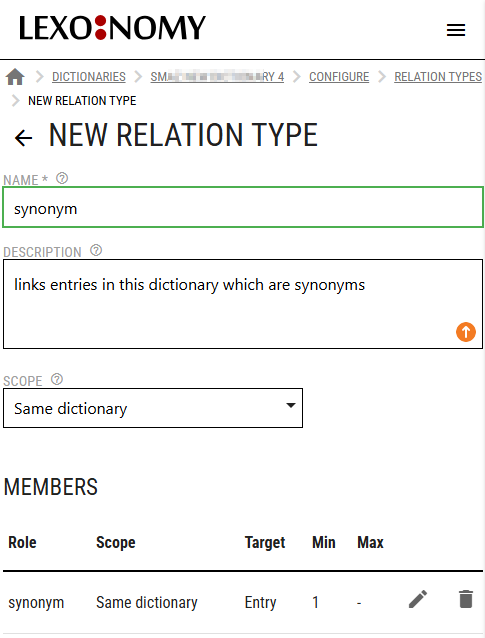
The synonym relation should only contain one member type. All synonyms are equal. None of them is more important than others. There is no hierarchy among them, one synonym is not dependent or superior to others.
Max is set to unlimited because any number of entries can be linked as synonyms of a word.
This relation will be used to link two or more entries similar in menaing. With this setup, only the whole entries can be linked. If entries have multiple senses and concrete senses should be linked as synonymous, look at the next example.
Example 2 – relation type: synonym – linking senses
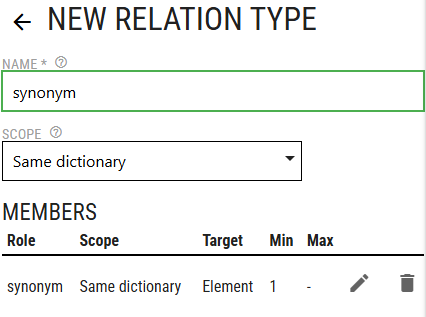
and use these settings for the member
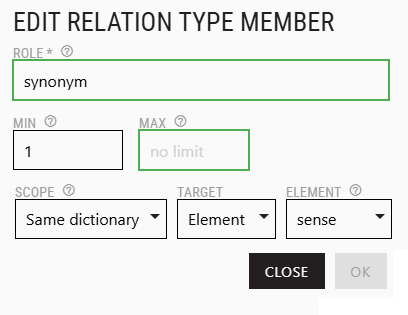
Unlike the exmaple above, this synonym relation is set up to link concrete senses. Pay attention to the settings of the relation member. It now specifies that the link will be at sense level.
A concrete sense of one entry will be linked to a concrete sense of another entry.
Example 3 – relation type: phrase
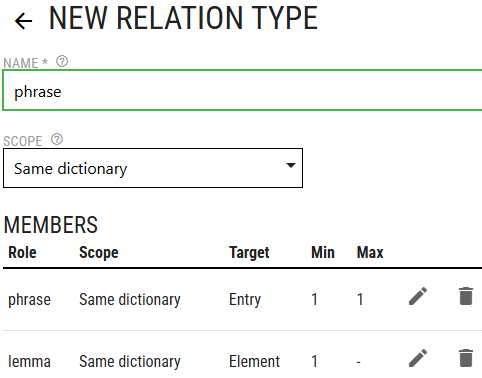
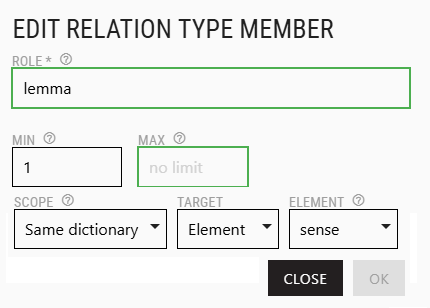
This relation type can be used to link phrases (idioms, proverbs, set phrases or other multiword expressions) to the entries for words which are in the phrase, e.g. to link the entry for once in a blue moon to the entires for blue and moon.
There are two members:
- phrase – the whole entry will be linked because phrases rarely have multiple senses
Min=1 Max=1 because exactly 1 phrase will be in the relation - lemma – the phrase will link to a concrete sense of the lemma (blue in once in a blue moon will be linked to blue (colour) and not to blue (feeling).
Max=unlimited because a phrase can contain various numbers of lemmas
One or more relations?
FAQ: Should I have one relation for all types of multiword expressions or should I have a separate type for idioms, a separate type for proverbs, a separate type for set phrases etc?
Technically, there is no difference. The dictionary data will be valid irrespective of how many relation types there are.However, having just one type means that all multiword expressions will be treated equally.
For example, they will be displayed in the same design. Normally, proverbs use different formatting (colour, indentation etc.) from idioms to make them easy for the reader to distinguish. Having only one type also means it will not be possible to use advanced searching to only find idioms or to only find proverbs. It will only be possible to search for all mutliword expressions.
The choice is yours but it is recommended to have a different type for each type of information.